


In Part 1 of this series I covered why we picked KMP at UpKeep, what slice of business logic we share between iOS and Android, and that we picked Clean Architecture for the KMP side to have shared use cases. This is the second part of the series where I will go in detail on how the KMP codebase is structured and the architecture we have in it.
The iOS side of the story (how the prebuilt framework gets consumed, the bridge module that sits between our Swift code and the raw KMP types, our build and CI setup) will be covered in Part 3.
Why KMP?
The reason we use KMP and not something else is that it compiles down to native code on both platforms. On iOS it produces an Objective-C framework that Swift links against. On Android it’s just Kotlin, consumed natively the way any other Kotlin or Java code would be. No bridge, no JavaScript runtime, no embedded VM. Native on both sides.
The last point is very important. We want to keep the native look, feel, and smoothness of the apps we already have. With something like React Native it’s all or nothing - you go all in, and the moment you do, the whole app is React Native and, more importantly, your entire architecture is now subverted by its horrible reactive view-driven design. KMP doesn’t force you into that. It gives you complete optionality over how much code you share - everything from the UI down to the business logic, or just the slice you choose, where you choose it.
In our case we decided the business logic is the part worth sharing, and left everything else in the native code.
That optionality is also what lets us introduce KMP gradually. We can apply shared code surgically, one feature at a time, on both Android and iOS. React Native would again be all or nothing (or surgical, with an enormous setup overhead). KMP lets us migrate at our own pace without betting the whole app on it.
Submodule vs Monorepo
Any brand new Kotlin Multiplatform Mobile project starts life as a monorepo by default. The Android app, the iOS app, and the shared KMP code all live in one repository, split into their own folders. For a greenfield project that’s a great setup, and honestly it’s the one I’d personally prefer.
We decided that this would be too drastic of a change. We have ten-year-old iOS and Android codebases, each in its own repo, each with its own development and release workflow that the team relies on every day. We wanted to introduce shared KMP code gradually, without disturbing how our iOS and Android engineers already work.
So we made the shared code its own repository (the one we call mobile-common) and pulled it into both the iOS and Android repos as a git submodule.
We could have left it as a completely separate repo that the apps just depend on. But in practice, a change on the iOS or Android side almost always goes hand in hand with a change on the KMP side. You’re building a feature up and down the stack at the same time - the UI and application logic in native Swift, the business logic and use cases in KMP. The submodule setup is what makes that a seamless experience: you open a similarly named PR in the app repo and in the mobile-common repo, and you make both sets of changes together in one go.
KMP Modularization
Inside the KMP repo, the code is split into feature modules that depend on a couple of foundation modules.
The feature modules are auth-common, workorder-common, parts-common, fleet-common, checklist-common, locations-common, and so on. One module per feature area.
Underneath them sit two foundation modules. Every feature depends on core-common. Features that need to persist data also depend on storage-common. Features that don’t persist anything just skip it.
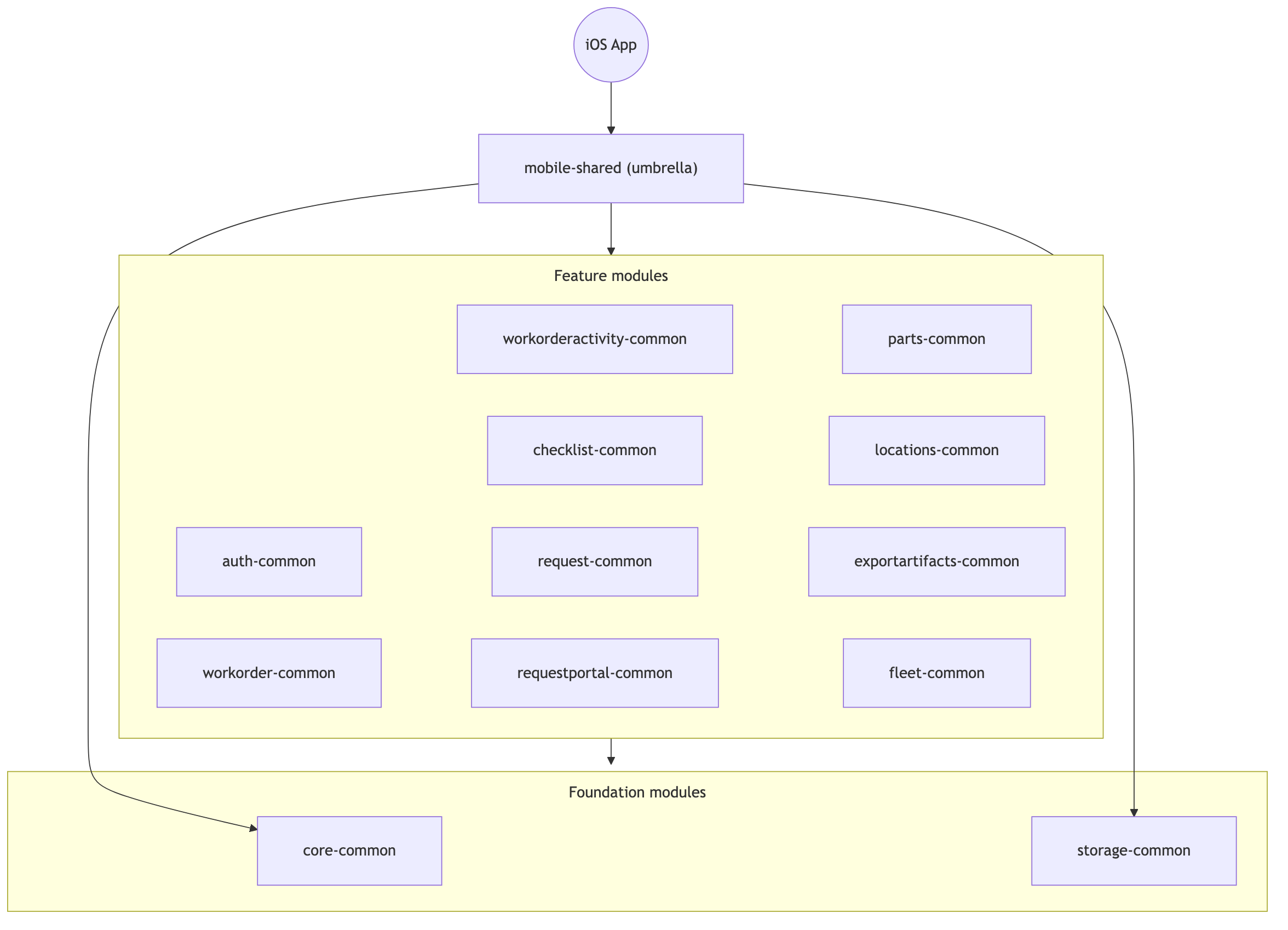
No feature module depends on another feature module. If two features need the same thing, that thing moves down into core-common. This keeps the dependency graph a tree instead of a tangle, and it means you can work on parts-common without ever thinking about workorder-common.
Honestly, we debated the modularization approach so much within the team, before we’d even started testing how KMP would look and feel in our codebase, that we’re still not sure this is the right setup. But it’s been about a year and a half now, and this module structure has held up pretty well for us.
When a native codebase wants to use a feature, it imports that module. On Android that’s literally implementation(project(":workorder-common")). On iOS it works a little differently - all the modules get bundled into a single umbrella framework that Swift imports as one unit. More details on that in Part 3.
One thing worth mentioning: the native code doesn’t have to be split into modules that mirror the KMP ones. Our iOS app undergoes modularization with Tuist currently, and it will align more with the KMP module structure over time, but we can’t do it everywhere at once. For the parts of the iOS code we haven’t migrated yet, we don’t worry about whether they mirror the KMP module setup. More on that in Part 3.
Use Cases are the High Level API of the KMP codebase
The intended use of the shared KMP codebase is through the Use Cases.
When a user taps a button in the app, the native code calls its respective application logic first (interactors, view models, etc.) and those call a use case. UpdateWorkOrderUseCase when they save a work order. GetWorkOrderActiveTimerUseCase when the screen needs to know if a timer is running. Each use case is a single, high-level unit of business logic that both apps call into the exact same way.
That last part is the whole point of using KMP and sharing the business logic.
When you have two native apps built by two different sets of people over ten years (and ours are both about that old now), they drift. One app calls one set of endpoints, the other calls a slightly different set. One sends a field as a string, the other sends it as an int to the same endpoint. One checks a permission before an action, the other forgot to.
None of this is anyone’s fault. It’s just what happens when the same feature gets written twice, in two languages, in two repos, by two people who were looking at slightly different tickets and made slightly different assumptions about how the thing was supposed to work.
Sharing the use case addresses this from the get-go. There’s one UpdateWorkOrderUseCase. It forms one request, hits one endpoint, runs one set of validations. Both apps get identical behavior because it’s literally the same compiled code.
So the mental model is straightforward: find the use case you need, call it, present the result. Everything underneath is plumbing you mostly don’t think about.
Feature Modules. Architectural Layers.
Each feature module is structured similarly and split into several layers:
Business Logic: Use Cases + domain models
Repository: Repositories + data models
Service Layer: Api Service + Api Models
Storage Layer: Storage Objects + DB Models
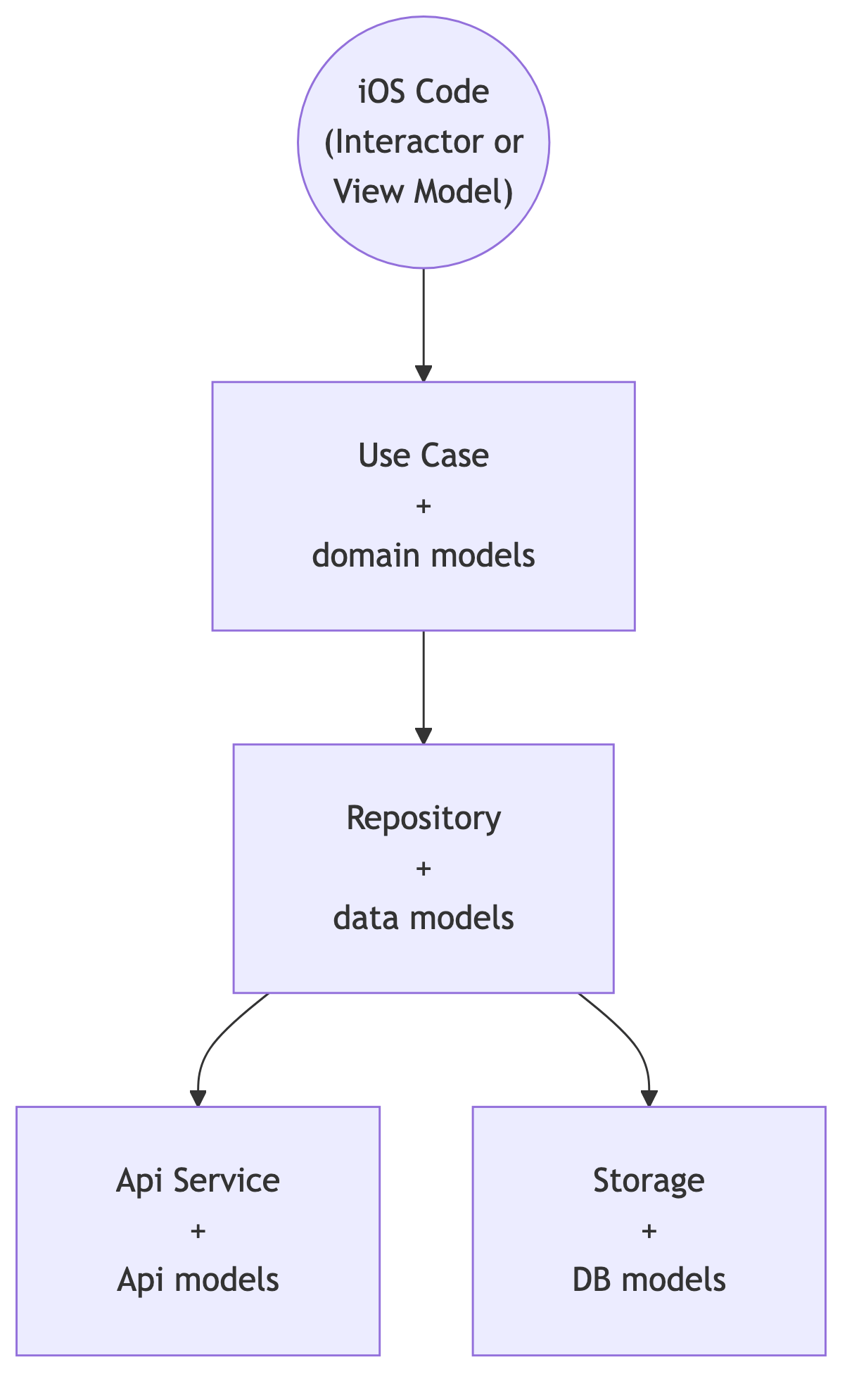
Let me walk it from the top down, because each layer has a clean single responsibility.
The Use Case sits at the top. This is where the actual useful work lives - the business rules, the permission checks, the validation, the calculations. The stuff that really matters to the user. Everything below the use case is plumbing that moves data around. The use case is the part that makes a decision.
The Repository sits beneath it. Its job is to get the data the use case asked for, by whatever means necessary - a network call through the service, a local read through storage, or some combination. Most of the time it’s just hitting the service. But the repository is the layer that gets to decide where data comes from, and it hides that decision from everyone above it.
The Api Service layer talks to the outside world. It forms requests against our backend APIs, sends them over Ktor, and deserializes the responses. That’s all it does. It knows about HTTP and JSON and nothing about business rules.
For now, only our HTTP (REST) requests go through KMP, not GraphQL. Our backend is a mix of both - REST and the GraphQL we’re slowly moving away from. We looked into GraphQL solutions for KMP but decided against integrating them for now, since at the time they were still in beta and not ready for a production release.
The Storage layer talks to the device. It reads and writes the on-device database. Same idea as the service layer, just pointed at local persistence instead of the network.
One note: the Api Service and the Storage layers are siblings. They sit at the same level and they never talk to each other. One handles remote, the other handles local, and neither knows the other exists.
Each of these layers has its own set of models, and mappers to convert between them. The service layer works in Api models that match the wire format, the repository works in its own data models, and the use case works in domain models that the apps actually see, with data mapped as it crosses each boundary.
Yes, it’s a lot of boilerplate, especially with all the models and mappers. But it keeps things cleanly separated and stops data from leaking between layers, which would break single responsibility and the other SOLID principles.
The Storage Layer
Storage works in two ways. In the first, KMP only provides the interface and the native app supplies the actual implementation - the real reads and writes happen in Core Data on iOS or Room on Android. In the second, KMP owns the whole thing end to end, with the persistence implemented in shared code via SQLDelight.
For the first approach, we deliberately leaned on plain OOP - interfaces and dependency injection - to let the native code supply the underlying implementation, rather than using KMP’s expect/actual mechanism. Solving this with proper design patterns and DI is far more robust than expect/actual, which is closer to a hack than a real solution.
Why support both? For legacy reasons. Both apps already had years of on-device persistence built before we introduced KMP. We didn’t want to force a rewrite of working storage code just to adopt the shared layer. So a feature can hand its persistence to KMP entirely, or it can let KMP define the contract and keep its existing native storage behind that contract. The repository above doesn’t care which - it just sees a storage interface.
That flexibility is what let us adopt KMP incrementally instead of all at once.
What’s in core-common?
core-common is the foundation every feature stands on. A few of the things that live there:
The network client - a single Ktor wrapper that every service uses, configured once with our headers, JSON handling, timeouts, and a validator that turns HTTP status codes into typed errors.
Use case base classes - the shared machinery that runs a use case on a background coroutine and hands the result back to the apps through callbacks (callbacks bridge to Swift closures cleanly, which matters on the iOS side).
The exception hierarchy - layered error types where each layer wraps the one below it, so by the time an error reaches the apps it’s a single domain-level error type they know how to handle.
The rule of thumb for what earns a spot in core-common: if a feature needs it twice, it moves here. If it might need it again someday, we wait until the second use case actually shows up. The second one rarely looks like the first.
Assembly & Dependency Injection
When we started, we figured we’d expose only the use cases and the domain models they hand back and forth. Keep everything else internal. The native apps would see a tidy little public surface of use cases and nothing more.
That’s not what happened. We ended up exposing basically all of the types to the consuming apps - the repositories, the services, the low-level classes, all of it.
We had to do it because we didn’t want to tackle the assembly problem yet and wanted a clean and clear dependency injection when we create and assemble each use case. We decided to leave DI and object assembly to each native app rather than bake a DI solution into KMP. And if the apps are the ones assembling the object graph, they need visibility into the constructors of every object they’re assembling. You can’t wire up a UseCaseImp with its RepositoryImp and ApiServiceImp if those types are hidden from you.
Why leave DI to the apps at all? Because a DI graph is state, and we made a deliberate call to keep application state out of the shared codebase. On top of that, both the Android and iOS apps already handle their own DI and assembly of their own objects anyway.
mobile-common is meant to be a stateless library of business logic. The moment it owns a DI container it owns lifecycle and state, and that’s one more thing we’d have to maintain and reason about across two platforms, so we’d rather each app manage its own assembly with the DI tools it already uses (more on the iOS side of that in Part 3).
The downside of course is that it technically breaks encapsulation. Nothing stops a native engineer from reaching past the use case and calling a repository or a service directly, even though those were never meant to be touched from the outside.
We’re watching it, and we might revisit the decision once we fully understand the repercussions. For now, convention and code review are what keep people calling use cases and not poking at the internals.
Unit-Testing
Because of how the layers split up, testing has a clear priority order.
The use cases are where the real logic lives, so the use cases are where unit tests pay off. A test that proves UpdateWorkOrderUseCase validates input correctly, checks the right permission, and calls the repository in the right order - that’s a test worth writing.
The other layers are mostly plumbing. A repository that forwards a call to a service, a service that forms a request and parses a response - there’s not a lot of logic there to get wrong, and the tests for it tend to just restate the implementation. We write them where they earn their keep, but I don’t lose sleep over coverage on the plumbing. I lose sleep over use case coverage.
Objective-C Limitations
One thing that we didn’t expect initially is that the iOS interop would leak into how we write the shared Kotlin.
Kotlin/Native compiles to an Objective-C framework, and Objective-C has limits that Kotlin doesn’t. For example:
No generics across the boundary. Objective-C has no real generics, so anything generic has to stay internal to KMP. If a use case wants to hand back a generic type, we resolve it at the boundary or wrap it in a concrete type first.
@ObjCNameon every use case. Kotlin flattens all interfaces into one Objective-C namespace and disambiguates clashes with trailing underscores. Without explicit naming, adding a new use case can silently rename the Swift-visible name of an existing one and break call sites that had nothing to do with your change. So every use case interface and method gets an explicit@ObjCName. (This is tracked upstream as JetBrains issue KT-55770 if you want to follow along.)
Neither of these is a big deal. Both will likely go away once KMP can export to Swift natively instead of going through Objective-C, but until then we live with the workarounds.
Whoaaa, Isn’t this a ton of boilerplate!?!?
Yes. Yes it is.
This architecture has a lot of moving parts per feature. Interfaces and implementations, models per layer, mappers between them. The first time you add a feature, it feels heavy - you’re writing a dozen files to make one network call happen.
Now, I can already hear Jacob Bartlett calling this a cargo cult. He’s taken a shot at me before - in that very article he warns engineers off “re-architecting the app to RIBs (sorry, Alex Bush)”. Yeah, that’s me. (No offense taken, Jacob. I love my RIBs.)
This is not cargo culting, because we don’t want to be “just like Uber” (insert your favorite unicorn company here) - instead we have a real need to standardize our implementation and reduce the amount of bugs and discrepancies we have between the two mobile codebases. Cargo culting would be jumping on the React Native bandwagon only because “well, ‘every’ company I know of is doing it”. And again, AI is now such a huge lever that a lot of the arguments that used to be valid are not as strong anymore.
The boilerplate used to be a real argument against it. It isn’t anymore. These days the boilerplate writes itself - the patterns are so regular and so predictable that AI codegen produces them correctly almost every time. The structure that used to be the cost is now the thing that makes the codegen reliable, because there’s no variation for the model to get confused by.
And what you get on the other side of that boilerplate is worth it. You get a codebase where every feature looks like every other feature, where a new engineer can open a module they’ve never seen and know exactly what each file does and where to add the next one, and where code review is fast because there’s a right shape and you can tell at a glance whether the code matches it.
At the end of the day, predictable and repeatable beats clever every time, especially on a small team maintaining a lot of surface area and features.
Conclusion
We’re very happy with our shared KMP implementation, even though it can feel heavy at first glance. As you get used to it, things make sense and are very predictable and standardized. And AI now makes the boilerplate not an issue anymore.
I personally can’t wait for direct Swift compilation instead of the Objective-C one, so that we don’t have to keep the wrappers we have on the Swift consuming side around the KMP shared code (more on that in Part 3 of this series).
I also personally think we have a few too many models and mappers for my liking, and I keep debating it with the team, but either way it’s a small optimization and design change compared to the overall structure that we’re happy with.
In the future we could do even more and potentially start folding the application logic, such as RIBs interactors, into the KMP side to be shared between iOS and Android as well. But that’s a bigger architectural endeavour that we don’t want to undertake just yet.
In Part 3 I’ll talk about the iOS side - how our Swift codebase is modularized with Tuist, the bridge module that turns these KMP use cases into something that feels native to call from Swift, and how we build and ship the framework without compiling Kotlin in CI.