

As I was saying in my previous post, I’m building a lot of apps and scripts and automations for myself these days.
So one of the things I’ve been working on has started as an app for personal use for real estate rental hunting. I’ve always been into real estate investing. I even bought my house 5 years ago with the sole purpose of using it as a rental and rent the rest of the rooms I don’t use myself. And I’ve actually done it and was renting a couple of rooms for a while until I got married and had a kid lol. But my love for real estate investing never faded. I keep lurking here and there and checking Zillow trying to find good rental investment deals. None so far unfortunately, the ratio of house price and mortgage and tax and insurance payments to the rental return I would get just doesn’t make sense these days. But the way I was analyzing properties I’d come across was very manual and tedious - I have built a spreadsheet calculator that, given a house purchase price and tax rate and mortgage interest rate and potential rent for the house would give me a rate of return and potential positive or negative cash flow on it.
The problem with it is that, well, it’s a spreadsheet - it’s tedious and error prone to enter data and to operate. You have to copy cells and formulas and God forbid you mess even one little thing in them - the whole thing blows up in your face and doesn’t work or has subtle calculation bugs. No wonder some entrepreneurs and VCs have a saying - “if there is a spreadsheet in there there must be an app begging to be built“. Well, my wife, who’s a spreadsheet wiz, would disagree, we poke each other about it all the time (she hates my “stupid apps” lol).
So, I built an app for myself to automate this.
https://rental-analyzer.alex-bush.com/
It’s a desktop web app (I know, horrible! As a mobile engineer how could I!?!?) that takes a Zillow URL that I found and scrapes the website and gets the current asking price for a house, tax rate, insurance, potential projected average rent, etc. and calculates potential rate of return on such investment.
(feel free to check it out but it serves mocked data, I don’t want you guys to burn through my rapid api personal free tier tokens lol, it’s not a prod app after all, just a tool for myself)
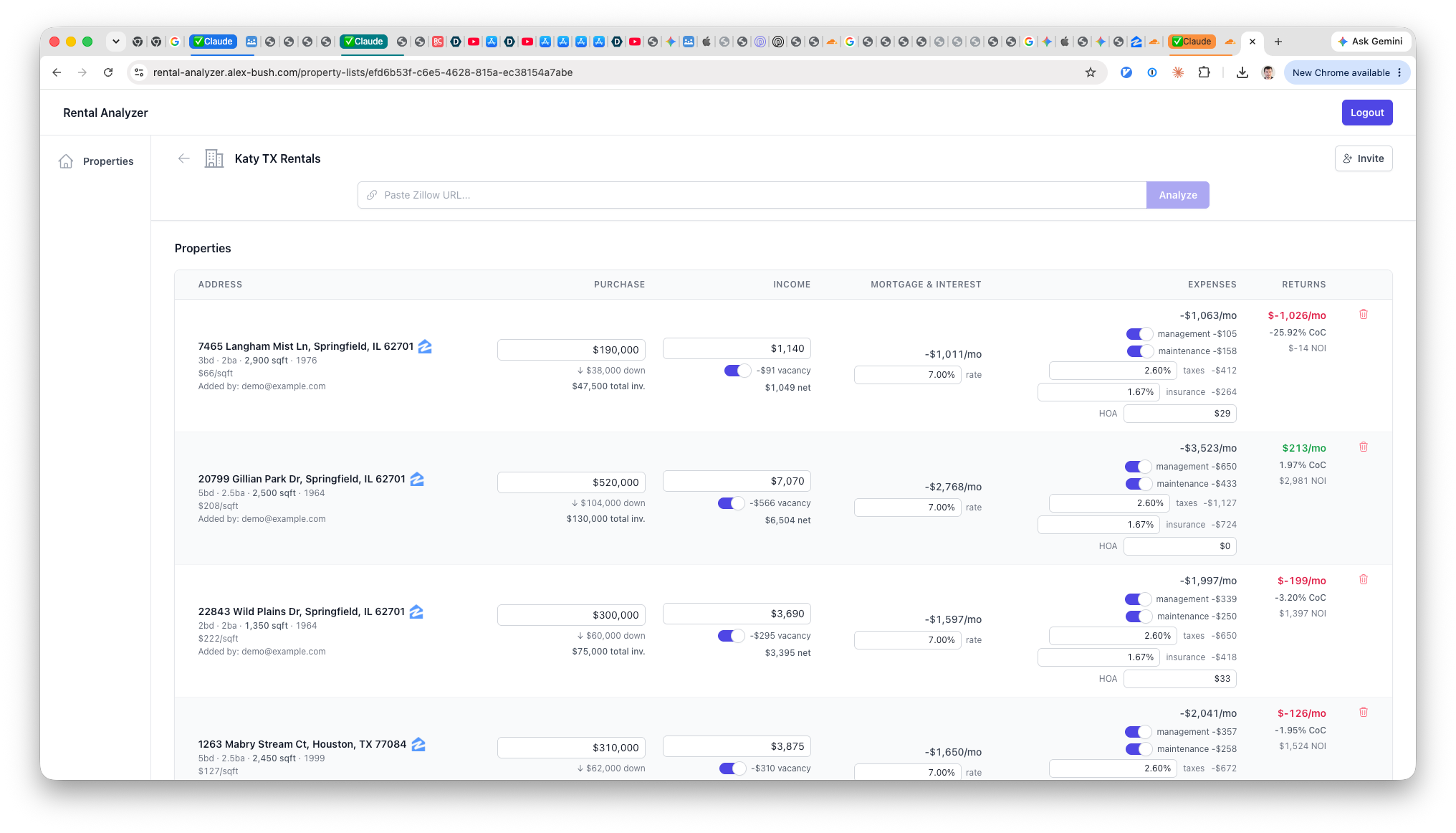
I fed my existing spreadsheet that I’ve used for many years into Claude and started to analyze it with it so that similar functionality can be replicated and rebuilt in this new app of mine. The interesting thing was - I found so many bugs and discrepancies in my spreadsheet you wouldn’t believe! I was able to work through all of them and improve upon them in my new app thanks to me, well, writing code this time that can actually be unit tested and examined and stressed for edge cases a million different ways unlike a spreadsheet. Indeed, if there is a spreadsheet out there there’s an app begging to be made!!!
So what’s interesting is this kind of app wouldn’t be feasible for me to do in my spare time before because the amount of effort to rewrite and rebuild the spreadsheet that I had that was working (I thought was working lol) isn’t worth it. But now with AI it was incredibly fast and easy to do! Don’t get me wrong, I spent a crap ton of time iterating through it and reviewing the code, testing it, etc. but it was a great learning process on how to harness AI and make it do the architecture right.
Speaking of the architecture - this is the thing that would be the most relevant and interesting to mobile engineers, bear with me.
I’ve built this project with a port of my favorite architecture RIBs from its Swift iOS implementation to Typescript on Web. I always knew that the architecture was flexible enough and abstracted out enough to run on any platform but I never had enough time and capacity to actually reimplement it. Well, I did now :) and it’s so great! The best part about it is that because the view layer is completely abstracted out of the business logic and the rest of the app I can run any view layer implementation I want and appease all the web devs who want to run React there! (Even though I personally prefer web components since they resemble the most the imperative nature of UIKit on web)
Originally Uber built two implementations of RIBs, one for iOS, and one for Android. It’s the same architecture just written twice for two specific platforms and tightly integrated with the UI layer of those platforms. It’s a tradeoff but it makes it very well done and adapted to those platforms. So this is exactly what I did in my typescript web reimplementation - I tightly coupled the view layer to the platform it runs on, web.
This architecture gave me fantastic results! I can actually make sense of web apps now and not get lost in a nightmare garbage of all the react component layer crap of the components that are “not components but really are just components or hooks or whatever the hell and wait everything is a state or a prop of the component and if you’re not doing it like that you’re a bigot doesn’t know nothing about web development and yada yada yada....”
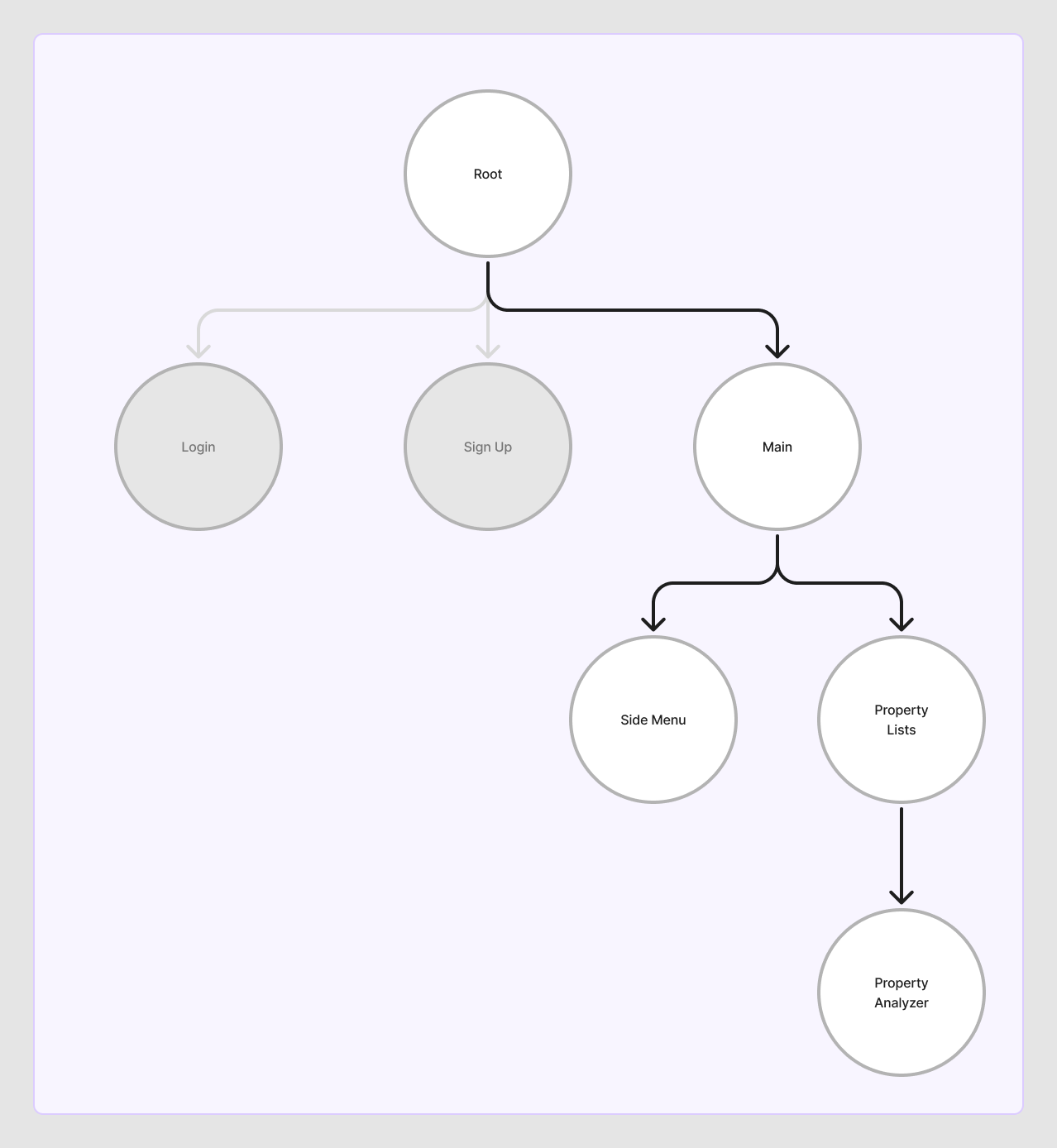
If you’re interested here’s the high level layout of this app’s architecture depicting RIBs tree that it’s composed of.
What’s awesome about this architecture is that it’s conceptually agnostic of the platform you’re building it on - it could be a web app like this one or an iOS app or an android app or a MacOS app or a Windows app, etc.
Everything starts with the Root RIB as the application starts and the window is loaded. Then the Root RIB decides whether to route to login or to the Main RIB depending on if the user is logged in or not. After that the Main RIB routes to two children: SideMenu and the PropertiesList. As I add more and more menu items to the side menu (I have an ROI calculator, some budgeting stuff, etc.) they’ll just be new items in the SideMenu list and there would a new RIBs for each one of them. I can either load them on demand as the user selects them and route away from the unselected one or I can load all of them at the same time in memory basically resembling how a tab bar controller on iOS would work and keep the main tabs in memory.
Basically RIBs is the perfect architecture for any client side application, whether it runs on the web or iOS or Android or desktop etc. And no, your web app is not “special”, and there is nothing to do to “make things work on the web” and there is no “but this is not how we do it in react/angular/whatever-the-hell” etc. etc. y’all are just overcomplicating it. A client side app is a client side app no matter what platform and where it runs on.
But, this is not the end of the story. What this enabled for me is reassurance, emboldenment, if you will, that I am on the right path. The architecture is great, and it works as well on web as on iOS or Android. But something was still lacking... you still had to write the code twice or three times or however many times for each platform you wanted to run it on... But I had a hunch that the RIBs architecture could also solve that. And it does!
More on that in the next post, it will be about mobile apps, I promise! Stay tuned.